Are you a dealership?

DealerHQ — dealer management software for Canadian used-car dealers

One record for every car, from appraisal to sale.

Most used-car dealers run three disconnected tools: an appraisal tool, a DMS and a marketing stack. In DealerHQ a trade you appraise becomes the unit on your lot, the listing on your website and the row AutoTrader pulls — without anyone typing it in three times.

Typed once

A trade appraised here becomes the stock unit, photos included

Feeds out

Your website, AutoTrader.ca, eDealer, Facebook Marketplace and a generic feed

Leads back

Forms, webhooks and ADF leads on one board, with source and vehicle

OMVIC fields

As-is, unfit, certified and prior use answered per unit

One source of truth

Everything comes in through one record. Everything goes out from it.

DealerHQ isn’t a pass-through. It’s the one place every channel reads from or writes to, so a change made once is the version every channel picks up on its next sync.

How inventory gets in

  • Manual entry Staff add or edit a vehicle directly.
  • VIN decode Scan a VIN and year, make, model, trim and engine fill in from the vehicle’s own decode data.
  • CSV import Bulk upload from another DMS export or the spreadsheet you already keep.
  • Scheduled DMS feed sync Point it at the feed URL you already have and it stays in step hourly, twice daily or daily.
  • Won appraisal → stock A trade you appraised and bought moves into inventory in one click, photos included — or automatically, if you switch that on.

The vehicle record

Price, photos, disclosures and status live here once. Change a price or mark a car sold and every channel reads the new value.

Where it goes out

  • Your own showroom website A live showroom on your own domain, or embedded into the site you have, with a compare tool and lead forms built in.
  • AutoTrader.ca An automated push straight to AutoTrader’s dealer feed, once AutoTrader approves your file.
  • eDealer — and CarGurus through it A nightly automated push to eDealer; CarGurus picks the same listings up from eDealer.
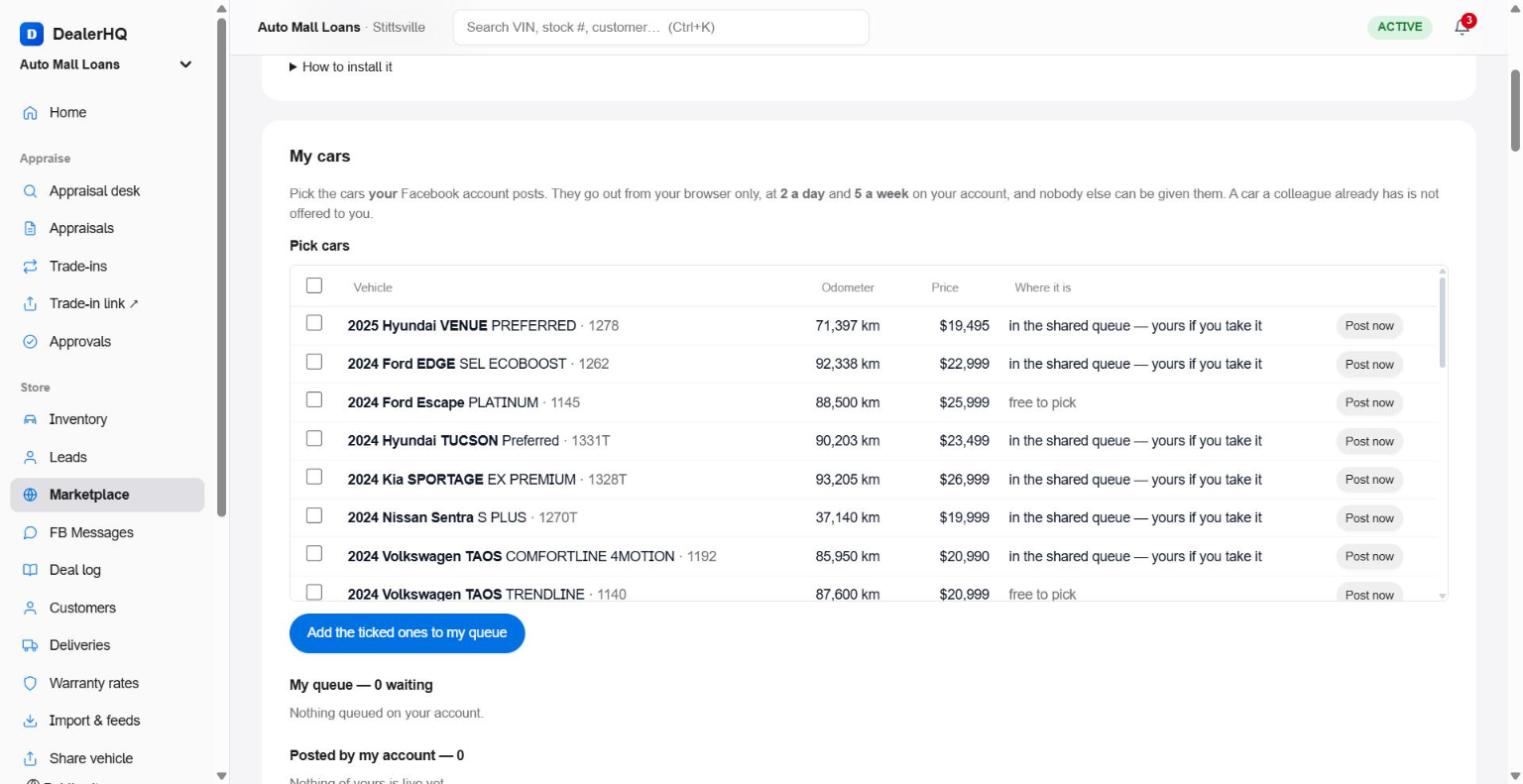
  • Facebook Marketplace Each salesperson picks cars and DealerHQ posts them from that person’s own browser, within a daily and weekly cap per account — and no two people get the same car.
  • Generic syndication feed A CSV address any system can pull — it’s how Engineered Inventory brings DealerHQ stock into a dealer’s WordPress site.

Leads flow back in: website forms, webhooks, ADF leads and the showroom’s own forms all land on one leads board inside DealerHQ, with the channel and the vehicle carried through.

See it

This is the actual software.

Screens from DealerHQ itself, not mockups — from a working Ontario dealership’s store, and a sample store for the appraisal.
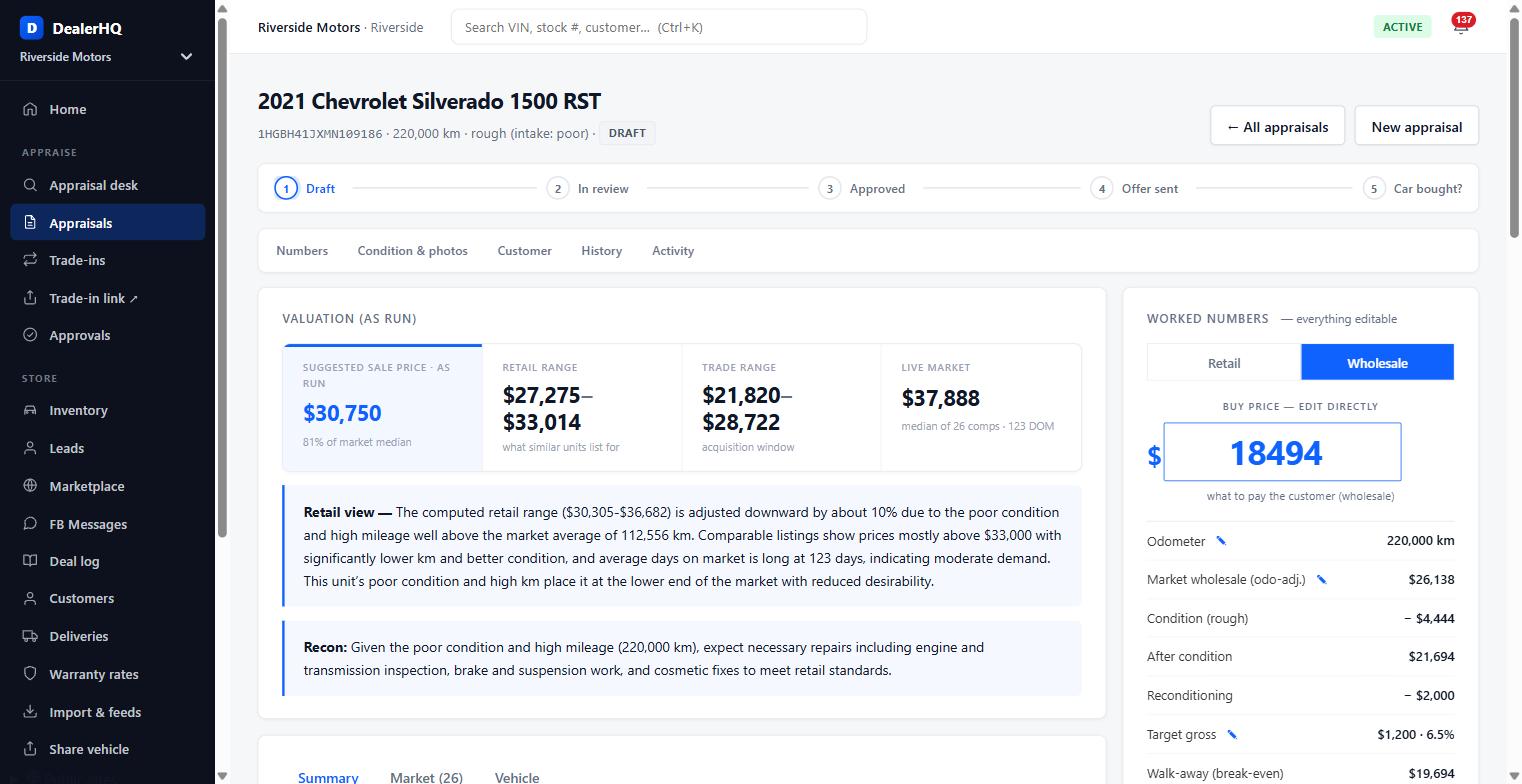
An appraisal record showing suggested sale price, retail range, trade range and live market median, a written retail view and recon note, and a worked-numbers panel with odometer, condition, reconditioning, target gross and walk-away price
The appraisal A suggested sale price, the ranges behind it, and every step from market wholesale to walk-away laid out and editable.
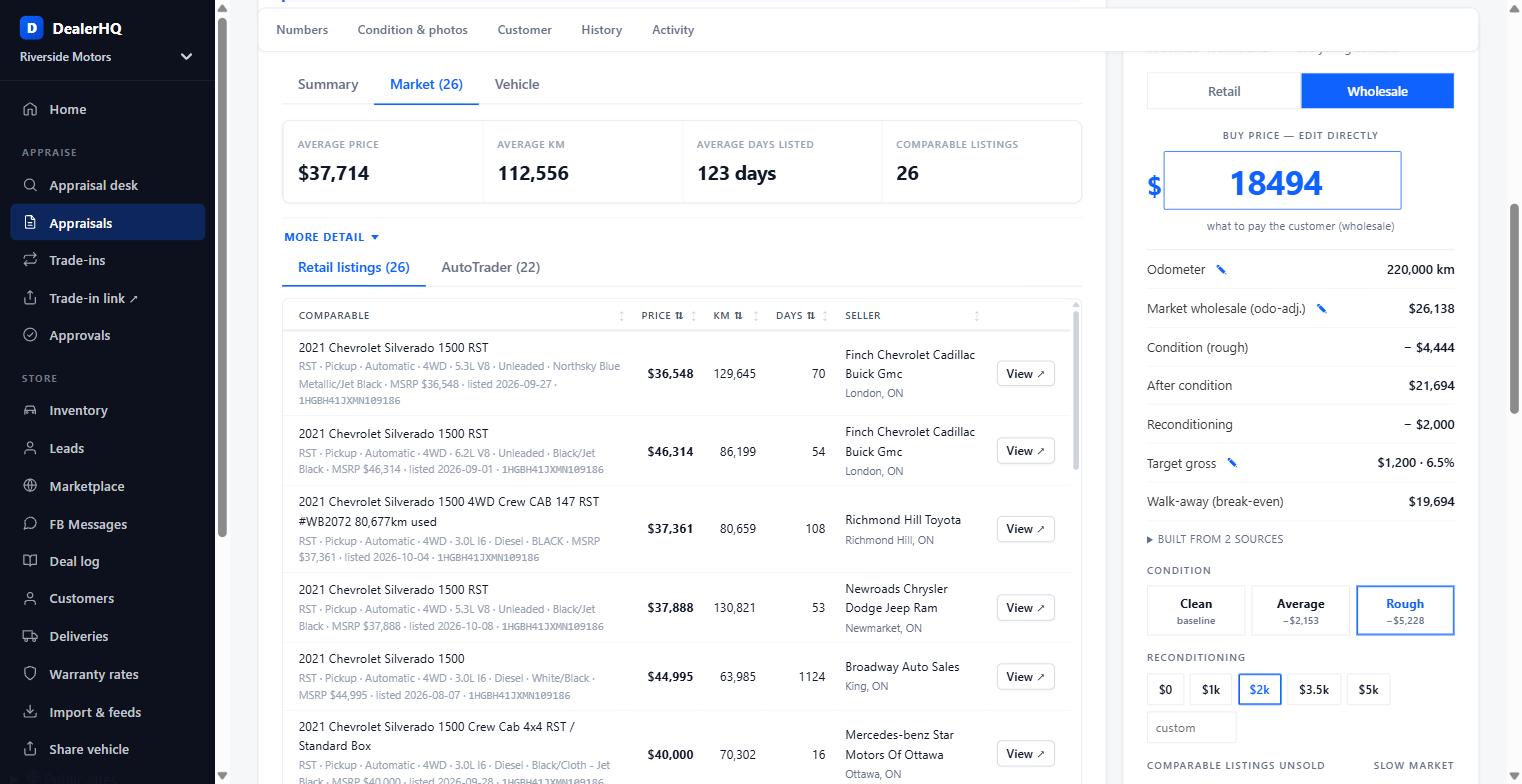
The market tab of an appraisal: average price, average kilometres, average days listed and comparable count above a table of competing dealer listings with price, kilometres, days listed and seller
The comps behind it The competing listings the number came from — price, kilometres, days listed and which dealer has it.
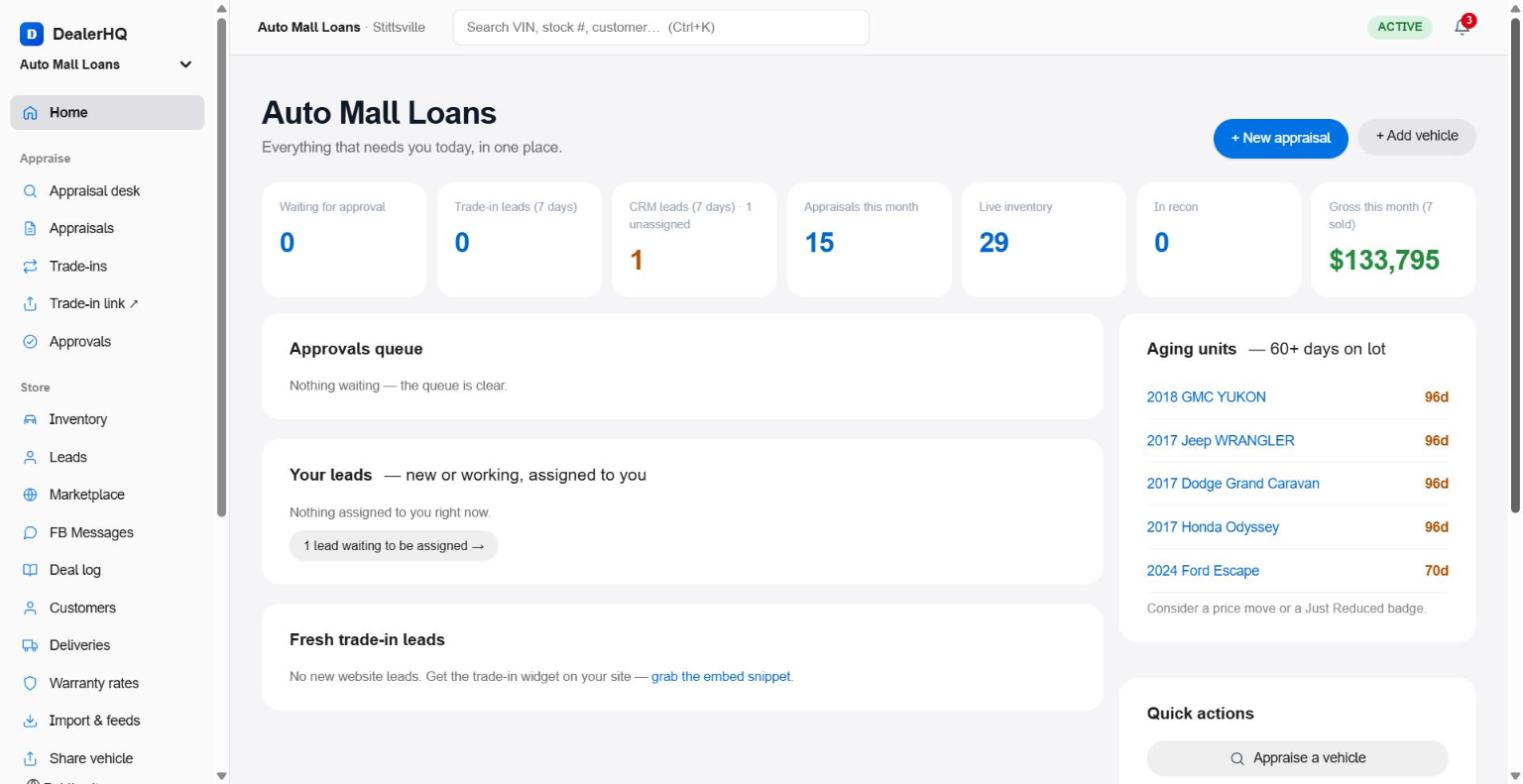
The DealerHQ home screen for a dealership: approvals waiting, trade-in and CRM leads, appraisals this month, live inventory, units in recon and gross this month, with the approvals queue, assigned leads and units over 60 days on the lot
The morning view Approvals, new leads, appraisals, live stock and the month’s gross on one screen — and the cars that have sat too long.
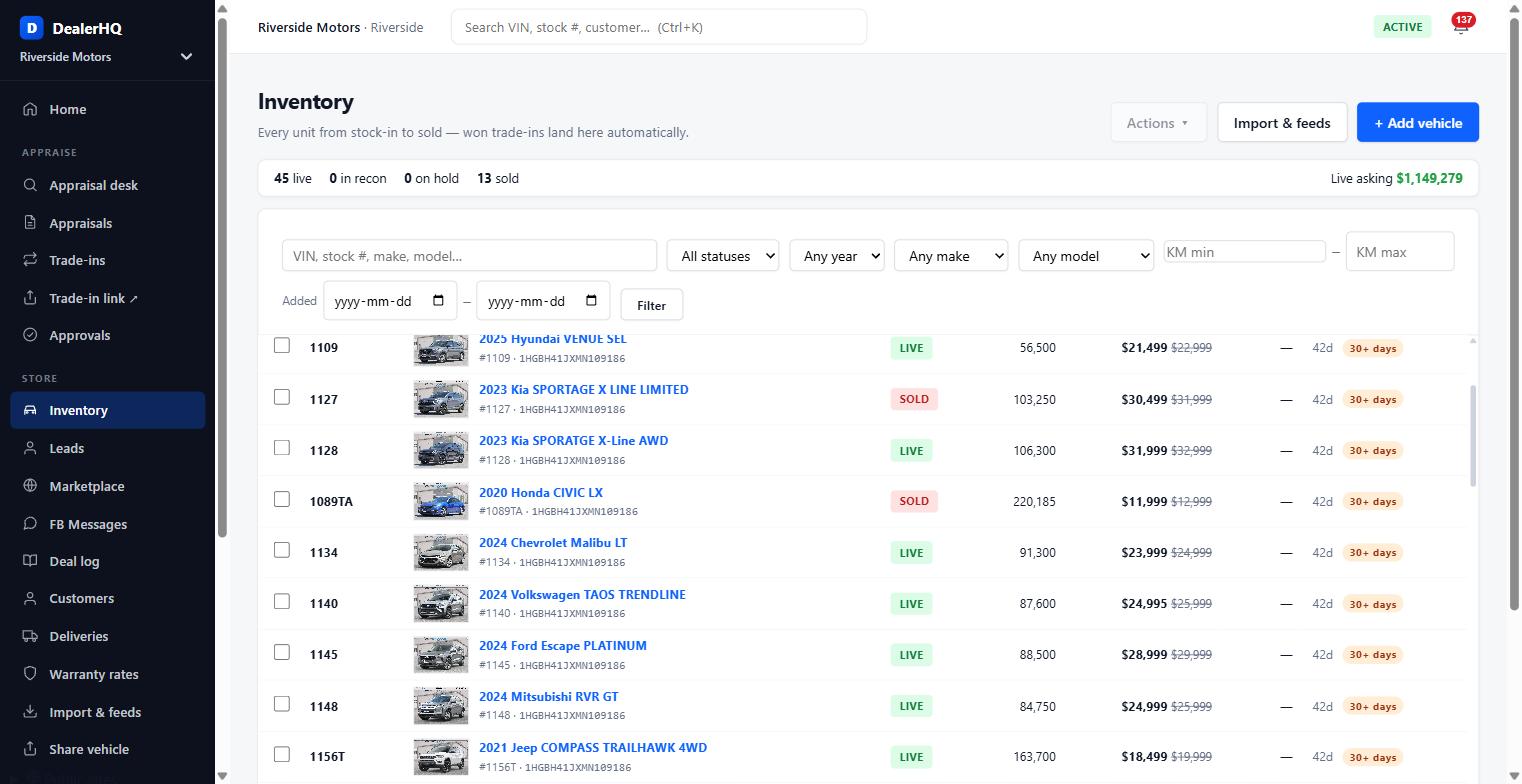
The inventory list: stock numbers, vehicle photos, live or sold status, kilometres, price and days in stock, with live, recon, hold and sold counts and total live asking value across the top
The lot Every unit with its status, price and days in stock, and the whole lot’s live asking value at the top.
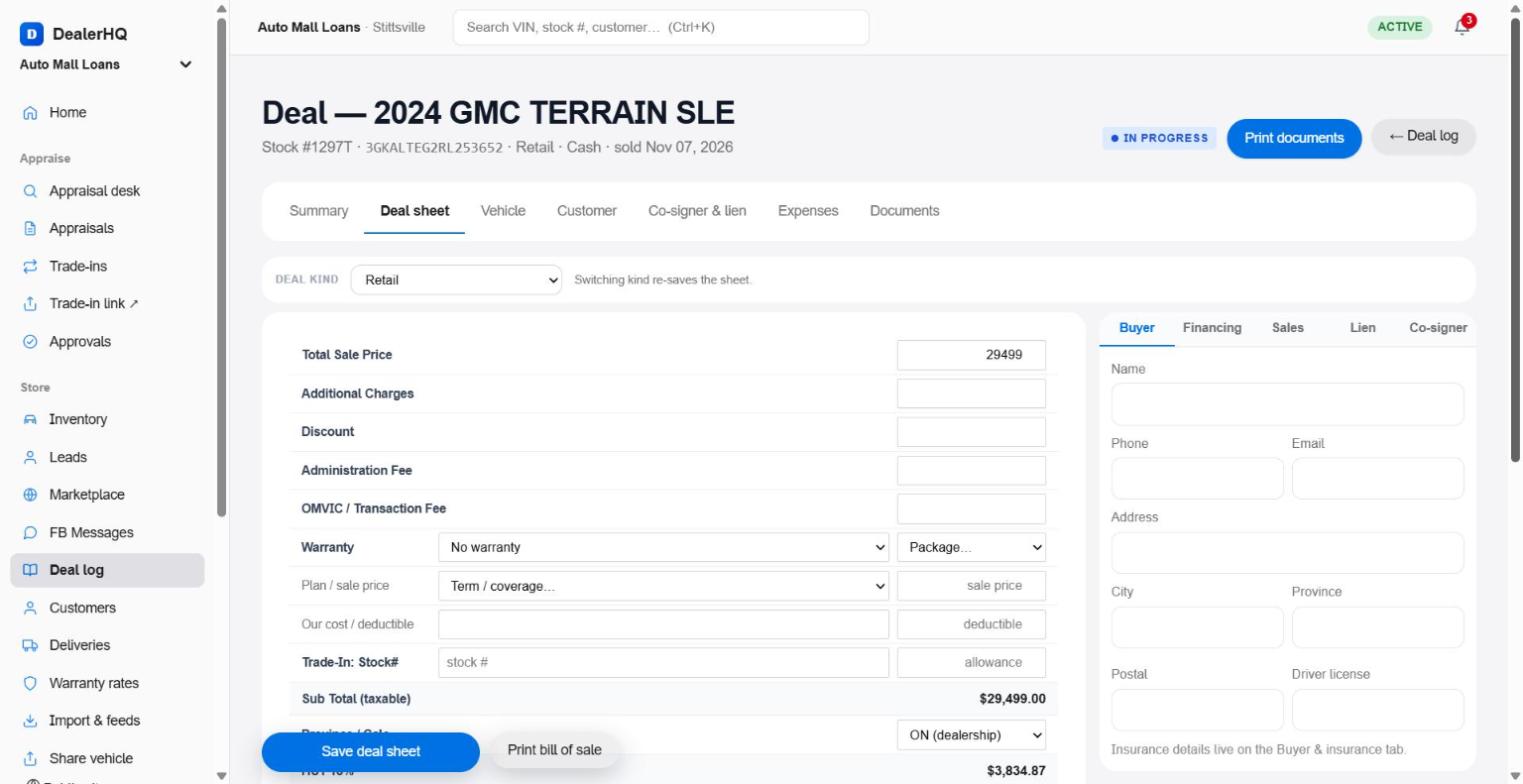
A deal sheet for a 2024 GMC Terrain: sale price, additional charges, discount, administration fee, OMVIC transaction fee, warranty plan and trade-in lines, Ontario HST, and buyer, financing, lien and co-signer tabs
The deal sheet Price, fees, warranty, trade-in and tax on one sheet, with print buttons for the documents built from it.
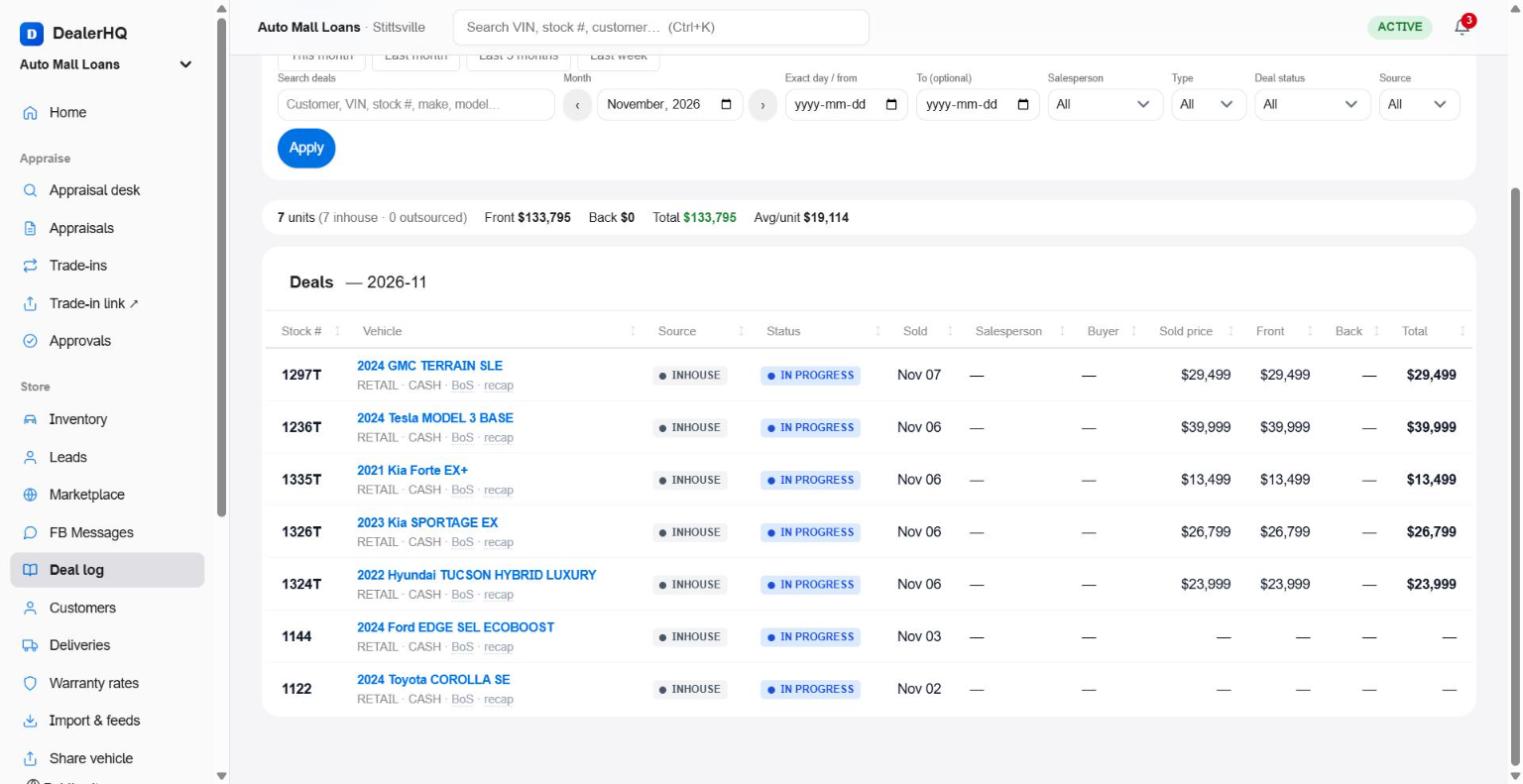
The deal log for a month: seven retail deals with stock number, vehicle, source, status, sold date, salesperson, buyer, sold price and front, back and total gross, with the month’s totals across the top
The deal log Every deal for the month with front and back gross, filterable by salesperson, type, status and source.
The Facebook Marketplace screen: a list of in-stock cars with kilometres and price, showing which are free to pick and which are already in the shared queue, with a post-now button on each and the daily and weekly posting caps stated above
Facebook Marketplace Each salesperson picks the cars their own Facebook account posts, within a daily and weekly cap, without doubling up on a colleague’s.

What DealerHQ does

01 — APPRAISE IT

A number you can defend

Scan the VIN, pull live retail comparables and Canadian market data, and get a value with the reasoning attached: condition and reconditioning adjustments, your target gross, and any Transport Canada recalls open on that unit.

02 — PRICE IT

The comps come with it

Every appraisal keeps the listings it was built from — competing asking prices, kilometres and days listed — scoped to your market radius, city or province, so the number still makes sense when you look at it again next week.

03 — SELL IT

The deal desk and the paperwork, from the same numbers

Price ladder, trade allowance, warranty and GAP, lender terms and provincial tax on one deal. The bill of sale, the UCDA-format wholesale bill of sale and the wholesale buyer agreement print from those same numbers, so nothing is re-keyed between the desk and the documents.

04 — RUN IT

Customers, disclosures and the whole group

A real profile for every buyer, with every vehicle they’ve bought and review-request tracking. OMVIC as-is, unfit, certified and prior-use answers confirmed per unit — never defaulted to “no”, and the disclosure text prints only where it applies. The official CARFAX badge on your listings once you add the report and its badge. Every vehicle change logged with who and when. Several stores, each with its own inventory and website, rolled up for whoever watches the group.

Pricing

Published pricing, per location. Every plan starts with a 7-day free trial; pay monthly, or yearly and save 15%.

Starter

A store that needs its inventory in one place.

$299a month per location

or $3,050 a year

$269 a month for each extra location

  • 3 users
  • Inventory
Start your free trial

Enterprise / Group

Bigger teams and dealer groups.

$799a month per location

or $8,150 a year

$719 a month for each extra location

  • Unlimited users
  • Everything in Professional
Start your free trial

Add-ons

  • Extra user: $25/month each
  • Accounting export: $39/month
  • Compliance pack (OMVIC/MVDA): $79/month

Prices in Canadian dollars, plus applicable tax. Want a walkthrough first? Request a demo. Every feature, plan by plan: dealerhq.ca/pricing

FAQ

Straight answers.

Does DealerHQ replace my DMS?
That’s what it’s built for: appraisal, inventory, the deal desk, the paperwork and your feeds in one system. If you’re not ready to switch, it can pull your current DMS feed on a schedule and run alongside it.
I already have a WordPress website. Do I have to give it up?
No. DealerHQ can host a showroom on your own domain or embed into the site you have — and if you run Engineered Inventory on WordPress, it imports DealerHQ’s feed, so your site stays yours and your stock stays in one place.
Does it handle OMVIC disclosures?
The fields are built in: as-is, unfit, certified and prior use (daily rental, police, taxi, rideshare), each answered yes, no or not confirmed per vehicle, and the disclosure text prints only where the answer is yes. What you advertise stays your responsibility; DealerHQ makes sure the questions are asked and the answers travel with the car.
Does it work for a dealer group?
Yes. Each store keeps its own inventory and its own public site, and the group view rolls up stock, deals and gross by store.

Want DealerHQ wired into your whole lead system?

We build the website, the ads and the CRM around it as one system — book a call and we’ll map it for your dealership.